I love dashboards.
Not because I like staring at numbers. Because when you live with a good dashboard long enough, you stop reading it. You glance, something registers, you move on. The visual grammar goes somewhere below conscious thought. You don’t check the graph. You notice when the graph looks wrong.
I spent years building exactly this for infrastructure. Grafana for server health. Custom statuslines for CI pipelines. Alert dashboards for things I never wanted to think about actively but needed to know about immediately if they went sideways. The feedback loop is always the same: you build the thing, you look at it constantly for a week, and then it fades to background. At some point you realize you would have noticed the problem before you consciously registered the metric. That’s when you know the dashboard is working.
When I started doing serious work with AI coding tools, the first thing I noticed was that there was nothing to look at.
brif is a statusline for Claude Code sessions. Two lines at the bottom of the terminal. Always there. Doesn’t ask for your attention. Just sits.
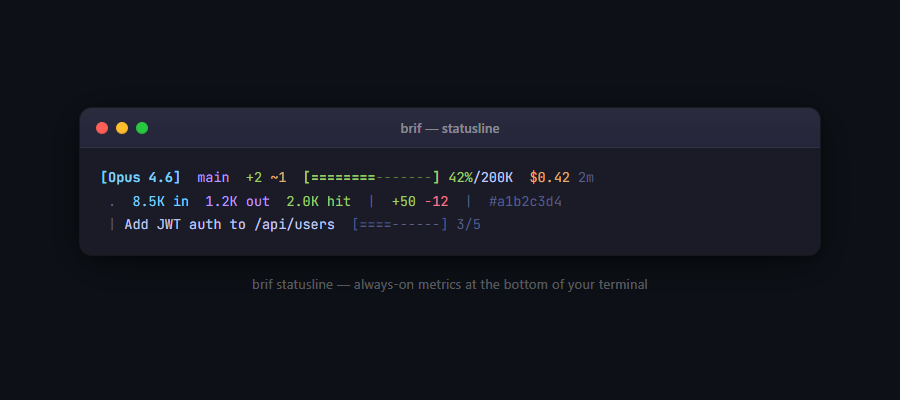
Reading left to right:
Model — [Opus 4.6]. Which Claude you’re talking to. Matters because Opus and Sonnet behave differently, cost differently, and have different context limits. You want to know what you’re running.
Branch — main. The git branch. Because switching tasks and forgetting to switch branches is a real thing that happens constantly.
File changes — +2 ~1. Two new files, one modified. This number tells you where you are in the work. If it’s climbing fast, something’s moving. If you’re in the red zone and it’s still going up, you want to know why.
The context bar — [=========-------] 42%/200K. This is the one I built it for.
Cost — $0.42. Real money, climbing with every exchange. Whether you’re watching or not.
Session time — 2m. How long this session has been running.
The second line is the detailed breakdown. Token flow: in, out, cache hits. Lines added and removed. Session ID. You don’t need to read it at normal cruising altitude. It’s there for when something seems off and you want the full picture.
The third line is the current goal and progress through tasks. I’ll get to that.
The context bar is the one that changes things.
When you’re working with an AI coding assistant, there’s a number that matters more than most things on screen. The context window. The amount of information the model can hold in its head at once. It’s not unlimited. When it fills up, the model starts forgetting the beginning of the conversation. Old code snippets. The constraint you explained three exchanges ago. The reason the architecture looks weird. The decision you didn’t want to revisit. Gone. You’re still talking. But whoever is on the other end doesn’t remember why you started.
Most people don’t see this happening. It happens quietly. The session gets gradually worse. You start wondering why Claude is suggesting things it already suggested, or asking questions it already asked. Usually you assume it’s you. Usually you restate things. Usually it doesn’t help.
Green means you have room. Yellow means start wrapping up. Red is 90%. Whatever is about to be forgotten is about to be forgotten.
You don’t stare at it. You glance. You notice when the color changes. The same way you notice when a latency graph spikes on a dashboard you’ve been watching for months without consciously watching it.
There’s a second view. A full pane.
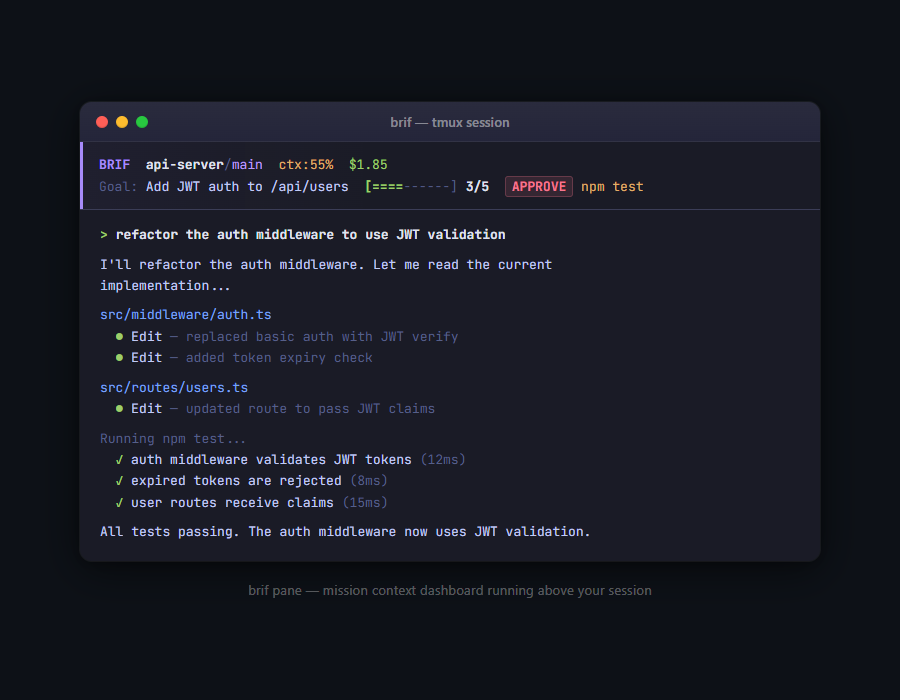
This is what you look at when something seems off and the statusline doesn’t give you enough. The goal is at the top. Context percentage and cost right there in the header. Progress bar showing where you are in the task list, with a task count. And the approval prompt, when the agent needs a decision rather than just permission.
The goal matters more than it sounds. I have a habit of starting sessions with a clear intent and letting them drift. The goal doesn’t drift. It stays there. And if what Claude is doing stops serving it, I can see that.
The APPROVE button is the right level of friction. Not every action. Not nothing. Just: here is a decision that was unclear, and rather than making it on your behalf, I’m surfacing it.
I’ve been building monitoring systems for a long time. CPU graphs. Pipeline health. Status pages for things that run themselves. The pattern is always the same: you get comfortable with the baseline, and then the system tells you when the baseline is broken.
brif is the first monitoring system I’ve built for something that’s doing my work.
The AI does the work. The statusline watches the AI. I watch the statusline. I’m not in the loop anymore. I’m watching a loop. Which is, honestly, the correct way to build things. The smoke detector on the ceiling. The check that pings you when something needs a decision. You don’t think about it until you need it.
Sometimes I’m sitting in the red zone, context at 93%, session two hours in, and I think: I should say something. I can’t always tell if that instinct is useful or just old.
Both things can be true.
The bar is green. For now.